Thursday, March 26, 2009

Tuesday, March 17, 2009
Hibernate Important Interview Question
1.What is O-R Mapping?
2.What is the difference between createCriteria and createQuery in Hibernate?
3.How would you implement on deletecasecade in Hiberante?
4.How Inheritance Implemented in Hiberante?
5.Is one Bean class can be involved with more than one relationship?
For example 1 class may have 1 to 1 and 1 to many
6.How do define compound primary key?
7.How to implement Oncasecasde deletion?
8.What is cascade="all"
Code Examples :
What are the steps to be followed to implement 1 to 1 database insert/update/delete?
Pre - Request :
Check we able to connect databse through Sample JSP program.
Step 1:
Table and Bean :
Create master table and Child table
Create bean for Master and Child table. Here Both Bean should contain gettter and setter value of other bean.
XML Entry :
In Master
Apart from XML Entry, There should be map to child table
<one-to-one name="<<Childtablename>>" class="<<ChildtableClass>>" cascade="all" />
<one-to-one name="employeeSalary" class="EmployeeSalary" cascade="all" />
Note : it refers only the class
In Child table
refer the master table's as below
In reference key column,
a)metioned generator class =foreign then mention property name
b)define one to one with property name and Class
2.What is the difference between createCriteria and createQuery in Hibernate?
3.How would you implement on deletecasecade in Hiberante?
4.How Inheritance Implemented in Hiberante?
5.Is one Bean class can be involved with more than one relationship?
For example 1 class may have 1 to 1 and 1 to many
6.How do define compound primary key?
7.How to implement Oncasecasde deletion?
8.What is cascade="all"
Code Examples :
What are the steps to be followed to implement 1 to 1 database insert/update/delete?
Pre - Request :
Check we able to connect databse through Sample JSP program.
Step 1:
Table and Bean :
Create master table and Child table
Create bean for Master and Child table. Here Both Bean should contain gettter and setter value of other bean.
XML Entry :
In Master
Apart from XML Entry, There should be map to child table
<one-to-one name="<<Childtablename>>" class="<<ChildtableClass>>" cascade="all" />
<one-to-one name="employeeSalary" class="EmployeeSalary" cascade="all" />
Note : it refers only the class
In Child table
refer the master table's as below
In reference key column,
a)metioned generator class =foreign then mention property name
b)define one to one with property name and Class
Friday, March 13, 2009
EXCEL MACRO
a. Code for connecting to the excel file
Sub connectivity()
On Error GoTo myerr:
Set cn1 = New ADODB.Connection
With cn1
.Provider = "Microsoft.Jet.OLEDB.4.0"
.ConnectionString = "Data Source='" & ThisWorkbook.FullName & "'; Extended Properties=Excel 8.0;"
.Open
End With
myerr:
If Err.Number <> 0 Then
MsgBox Err.Description
End If
End Sub
B. Code for reading the datas from the excel file
Sub readingrecord()
connectivity
Set rs = New ADODB.Recordset
rs.Open "select * from [sheet1$]", cn1, adOpenStatic, adLockOptimistic
If rs.EOF = False Then
rs.MoveFirst
Do While Not rs.EOF
myName = rs.Fields(1).Value & "," & rs.Fields(2).Value
Set rs1 = New ADODB.Recordset
rs1.Open "select * from [sheet1$] where [Namefield] ='" & myName & "'", cn1, adOpenStatic, adLockOptimistic
If rs1.EOF = True Then
Sheet7.Cells(i, 1) = myName
Sheet7.Cells(i, 2) = 0
i = i + 1
End If
rs.MoveNext
Loop
End If
End sub
C. Code for save the data to the external excel file.
Sub fileupload()
Sheets("sheet1").Select
Cells.Select
Selection.Copy
Workbooks.Add
ActiveSheet.Paste
ActiveWorkbook.SaveAs Filename:= _
"C:\test.xls", FileFormat:=xlNormal, _
Password:="", WriteResPassword:="", ReadOnlyRecommended:=False, _
CreateBackup:=False
Sheets("Sheet1").Select
Sheets("Sheet1").Name = "sheet1"
Range("C8").Select
ActiveWorkbook.Save
ActiveWorkbook.Close
Range("A1").Select
End Sub
Sub connectivity()
On Error GoTo myerr:
Set cn1 = New ADODB.Connection
With cn1
.Provider = "Microsoft.Jet.OLEDB.4.0"
.ConnectionString = "Data Source='" & ThisWorkbook.FullName & "'; Extended Properties=Excel 8.0;"
.Open
End With
myerr:
If Err.Number <> 0 Then
MsgBox Err.Description
End If
End Sub
B. Code for reading the datas from the excel file
Sub readingrecord()
connectivity
Set rs = New ADODB.Recordset
rs.Open "select * from [sheet1$]", cn1, adOpenStatic, adLockOptimistic
If rs.EOF = False Then
rs.MoveFirst
Do While Not rs.EOF
myName = rs.Fields(1).Value & "," & rs.Fields(2).Value
Set rs1 = New ADODB.Recordset
rs1.Open "select * from [sheet1$] where [Namefield] ='" & myName & "'", cn1, adOpenStatic, adLockOptimistic
If rs1.EOF = True Then
Sheet7.Cells(i, 1) = myName
Sheet7.Cells(i, 2) = 0
i = i + 1
End If
rs.MoveNext
Loop
End If
End sub
C. Code for save the data to the external excel file.
Sub fileupload()
Sheets("sheet1").Select
Cells.Select
Selection.Copy
Workbooks.Add
ActiveSheet.Paste
ActiveWorkbook.SaveAs Filename:= _
"C:\test.xls", FileFormat:=xlNormal, _
Password:="", WriteResPassword:="", ReadOnlyRecommended:=False, _
CreateBackup:=False
Sheets("Sheet1").Select
Sheets("Sheet1").Name = "sheet1"
Range("C8").Select
ActiveWorkbook.Save
ActiveWorkbook.Close
Range("A1").Select
End Sub
Thursday, March 12, 2009
SQL Server Back Up and Restoration
. Installation of SQL Server Database:
Click on SQLeval.exe.
Once the extraction is complete, click on setup.bat
Follow the below Instruction and complete the database server Installation.
1
2
3
4
5
Password as ehr/ehr
SQL Server Installation completed.
Configure DSN :
Start the database.
Click on SQL Server Enterprise Manager.
Expand the top most node.
Right click on database and click on New Database.
Create two databases core_db and core_db_session and note down the location of the data file and log file in both the cases.
Right click on core_db and click on All tasks menu. Click on Restore Database.
Click on From Device button as shown below in Fig 23
Fig 23:

Locate the core_db file and core_db_session file as shown below in Fig 24.
Fig 24:
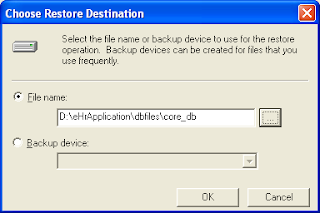
On doing this, the following screen as shown below in Fig 25
will get displayed :
Click on Options tab and provide the locations of data file and the log files whose location was recorded in the previous steps and as shown below in Fig 26.
Fig 26:
Click on Ok button. The message will get displayed as shown below in Fig 27.
Fig 27
8. Configuration of Datasource:
Go to Control Panel. Click on Administrative tools / DataSources. On doing so a popup window will appear as shown below in Fig 28.
Fig 28:
Click on System DSN tab as shown below in Fig 29.
Fig 29:
Click on Add button. A popup screen similar to the one shown below in Fig 30
will appear .
Fig 30:
Select SQL Server and click on Finish Button. On Doing so another popup screen will get displayed as shown below in Fig 31
Fig 31:
Fill the data source name and select the server as shown above. Click on Next button
And fill the login id as well as the password. Use sa as login id and password as ehr
Fig 32:
Click on Next button and the following screen as shown below in Fig 33 will get displayed.
Fig 33
Click on Next button and the screen as shown below in Fig 34 will get displayed.
Fig 34:
Click on Finish.
Test the DSN Set up
Similarly create another datasource core_db_session.
Click on SQLeval.exe.
Once the extraction is complete, click on setup.bat
Follow the below Instruction and complete the database server Installation.
1
2
3
4
5
Password as ehr/ehr
SQL Server Installation completed.
Configure DSN :
Start the database.
Click on SQL Server Enterprise Manager.
Expand the top most node.
Right click on database and click on New Database.
Create two databases core_db and core_db_session and note down the location of the data file and log file in both the cases.
Right click on core_db and click on All tasks menu. Click on Restore Database.
Click on From Device button as shown below in Fig 23
Fig 23:

Locate the core_db file and core_db_session file as shown below in Fig 24.
Fig 24:

On doing this, the following screen as shown below in Fig 25
will get displayed :
Click on Options tab and provide the locations of data file and the log files whose location was recorded in the previous steps and as shown below in Fig 26.
Fig 26:
Click on Ok button. The message will get displayed as shown below in Fig 27.
Fig 27
8. Configuration of Datasource:
Go to Control Panel. Click on Administrative tools / DataSources. On doing so a popup window will appear as shown below in Fig 28.
Fig 28:
Click on System DSN tab as shown below in Fig 29.
Fig 29:
Click on Add button. A popup screen similar to the one shown below in Fig 30
will appear .
Fig 30:
Select SQL Server and click on Finish Button. On Doing so another popup screen will get displayed as shown below in Fig 31
Fig 31:
Fill the data source name and select the server as shown above. Click on Next button
And fill the login id as well as the password. Use sa as login id and password as ehr
Fig 32:
Click on Next button and the following screen as shown below in Fig 33 will get displayed.
Fig 33
Click on Next button and the screen as shown below in Fig 34 will get displayed.
Fig 34:
Click on Finish.
Test the DSN Set up
Similarly create another datasource core_db_session.
Wednesday, March 11, 2009
My Code Link
Hi Friends
Here I have attached some of the samples I have developed
Please use it wherever is it required.
The Link is :MY CODES
Here I have attached some of the samples I have developed
Please use it wherever is it required.
The Link is :MY CODES
XML & XSL EXAMPLE
<?xml version="1.0"?>
<?xml-stylesheet type="text/xsl" href="Input.xsl"?>
<project>
<class>
<type>private</type>
<Name>AddTwasdsoNumbers</Name>
</class>
<variable>
<var>
<type> int </type>
<Name>x</Name>
</var>
<var>
<type> int </type>
<Name>y</Name>
</var>
</variable>
<funtionmodule>
<var>
<Name>addtwonumber</Name>
<arg>
<type> int </type>
<Name>x</Name>
</arg>
<arg>
<type> int </type>
<Name>y</Name>
</arg>
<returntype> int </returntype>
</var>
</funtionmodule>
</project>
<?xml version="1.0"?>
<xsl:stylesheet version="1.0" xmlns:xsl="http://www.w3.org/1999/XSL/Transform">
<xsl:template match="/">
<html>
<body>
<xsl:call-template name="project_class"/>
</body>
</html>
</xsl:template>
<xsl:template name="project_class">
<xsl:value-of select="project/class/type" disable-output-escaping="no"/>
<font color="red">class <xsl:value-of select="project/class/Name" disable-output-escaping="no"/> {
<br/></font> <div/>
<xsl:call-template name="project_Variable"/>
<br/>
<xsl:call-template name="project_Methods"/>
<br/>
}
</xsl:template>
<xsl:template name="project_Variable">
<xsl:for-each select="project/variable/var">
<xsl:value-of select="type" disable-output-escaping="no"/>
<xsl:value-of select="Name"/>
<br/>
</xsl:for-each>
</xsl:template>
<xsl:template name="project_Methods">
<xsl:for-each select="project/funtionmodule/var">
public <xsl:value-of select="returntype" disable-output-escaping="no"/> <xsl:value-of select="Name"/>() thrwos Exception{
<br/>
Rajnikanth
}
</xsl:for-each>
</xsl:template>
</xsl:stylesheet><!-- Stylus Studio meta-information - (c) 2004-2006. Progress Software Corporation. All rights reserved.
-->
Another Example :
<?xml version="1.0"?>
<?xml-stylesheet type="text/xsl" href="emp.xsl"?>
<database name="scott">
<table-name name="Employee">
<fields>
<column-name>empid</column-name>
<column-type>number</column-type>
<column-size>5</column-size>
</fields>
<fields>
<column-name>empname</column-name>
<column-type>varchar</column-type>
<column-size>5</column-size>
</fields>
</table-name>
<table-name name="Student">
<fields>
<column-name>studentid</column-name>
<column-type>number</column-type>
<column-size>5</column-size>
</fields>
<fields>
<column-name>studentname</column-name>
<column-type>varchar</column-type>
<column-size>5</column-size>
</fields>
</table-name>
</database>
<?xml version='1.0'?>
<xsl:stylesheet version="1.0" xmlns:xsl="http://www.w3.org/1999/XSL/Transform">
<xsl:output method="html"/>
<xsl:template match="/">
<html>
<body>
<xsl:for-each select="database/table-name">
<table>
<tr>
<td><h4>Table Name:</h4></td><td><xsl:value-of select="@name"/></td>
</tr>
</table>
<table>
<tr width="250">
<th width="100">Name</th>
<th width="100">Type</th>
<th width="50">Size</th>
</tr>
<xsl:for-each select="fields">
<tr>
<td>
<xsl:value-of select="column-name"/>
</td>
<td>
<xsl:value-of select="column-type"/>
</td>
<td>
<xsl:value-of select="column-size"/>
</td>
</tr>
</xsl:for-each>
</table>
<br/>
<br/>
<br/>
</xsl:for-each>
========================
form submition
========================
<xsl:for-each select="database/table-name">
Table:<xsl:value-of select="@name"/>
<table>
<xsl:for-each select="fields">
<tr>
DB EMP NAME :<xsl:value-of select="column-name"/> :
USEREMPNAME :
<input type="text">
<xsl:attribute name="value"> <xsl:value-of select="column-name"/>
</xsl:attribute>
</input>
</tr>
</xsl:for-each>
</table>
</xsl:for-each>
</body>
</html>
</xsl:template>
</xsl:stylesheet>
<?xml-stylesheet type="text/xsl" href="Input.xsl"?>
<project>
<class>
<type>private</type>
<Name>AddTwasdsoNumbers</Name>
</class>
<variable>
<var>
<type> int </type>
<Name>x</Name>
</var>
<var>
<type> int </type>
<Name>y</Name>
</var>
</variable>
<funtionmodule>
<var>
<Name>addtwonumber</Name>
<arg>
<type> int </type>
<Name>x</Name>
</arg>
<arg>
<type> int </type>
<Name>y</Name>
</arg>
<returntype> int </returntype>
</var>
</funtionmodule>
</project>
<?xml version="1.0"?>
<xsl:stylesheet version="1.0" xmlns:xsl="http://www.w3.org/1999/XSL/Transform">
<xsl:template match="/">
<html>
<body>
<xsl:call-template name="project_class"/>
</body>
</html>
</xsl:template>
<xsl:template name="project_class">
<xsl:value-of select="project/class/type" disable-output-escaping="no"/>
<font color="red">class <xsl:value-of select="project/class/Name" disable-output-escaping="no"/> {
<br/></font> <div/>
<xsl:call-template name="project_Variable"/>
<br/>
<xsl:call-template name="project_Methods"/>
<br/>
}
</xsl:template>
<xsl:template name="project_Variable">
<xsl:for-each select="project/variable/var">
<xsl:value-of select="type" disable-output-escaping="no"/>
<xsl:value-of select="Name"/>
<br/>
</xsl:for-each>
</xsl:template>
<xsl:template name="project_Methods">
<xsl:for-each select="project/funtionmodule/var">
public <xsl:value-of select="returntype" disable-output-escaping="no"/> <xsl:value-of select="Name"/>() thrwos Exception{
<br/>
Rajnikanth
}
</xsl:for-each>
</xsl:template>
</xsl:stylesheet><!-- Stylus Studio meta-information - (c) 2004-2006. Progress Software Corporation. All rights reserved.
-->
Another Example :
<?xml version="1.0"?>
<?xml-stylesheet type="text/xsl" href="emp.xsl"?>
<database name="scott">
<table-name name="Employee">
<fields>
<column-name>empid</column-name>
<column-type>number</column-type>
<column-size>5</column-size>
</fields>
<fields>
<column-name>empname</column-name>
<column-type>varchar</column-type>
<column-size>5</column-size>
</fields>
</table-name>
<table-name name="Student">
<fields>
<column-name>studentid</column-name>
<column-type>number</column-type>
<column-size>5</column-size>
</fields>
<fields>
<column-name>studentname</column-name>
<column-type>varchar</column-type>
<column-size>5</column-size>
</fields>
</table-name>
</database>
<?xml version='1.0'?>
<xsl:stylesheet version="1.0" xmlns:xsl="http://www.w3.org/1999/XSL/Transform">
<xsl:output method="html"/>
<xsl:template match="/">
<html>
<body>
<xsl:for-each select="database/table-name">
<table>
<tr>
<td><h4>Table Name:</h4></td><td><xsl:value-of select="@name"/></td>
</tr>
</table>
<table>
<tr width="250">
<th width="100">Name</th>
<th width="100">Type</th>
<th width="50">Size</th>
</tr>
<xsl:for-each select="fields">
<tr>
<td>
<xsl:value-of select="column-name"/>
</td>
<td>
<xsl:value-of select="column-type"/>
</td>
<td>
<xsl:value-of select="column-size"/>
</td>
</tr>
</xsl:for-each>
</table>
<br/>
<br/>
<br/>
</xsl:for-each>
========================
form submition
========================
<xsl:for-each select="database/table-name">
Table:<xsl:value-of select="@name"/>
<table>
<xsl:for-each select="fields">
<tr>
DB EMP NAME :<xsl:value-of select="column-name"/> :
USEREMPNAME :
<input type="text">
<xsl:attribute name="value"> <xsl:value-of select="column-name"/>
</xsl:attribute>
</input>
</tr>
</xsl:for-each>
</table>
</xsl:for-each>
</body>
</html>
</xsl:template>
</xsl:stylesheet>
Subscribe to:
Posts (Atom)